LOOP sites have LIVE and DEV servers, alongside a 'Preview' mode for page changes.
In general:
- Use LIVE for day-to-day updates, new stories, pages etc
- Use DEV for larger multi-page campaigns
You can use the Preview mode on LIVE or DEV to see what a page looks like.
If it's a new page, then you can often publish straightaway, just don't add it to the menu. From there you can use the 'INFO' button to the top right to get the page address and view it live in your browser. Once you're happy, add it to the menu or other pages to go live!
Previewing pages
Use the preview option to see how a page is coming together
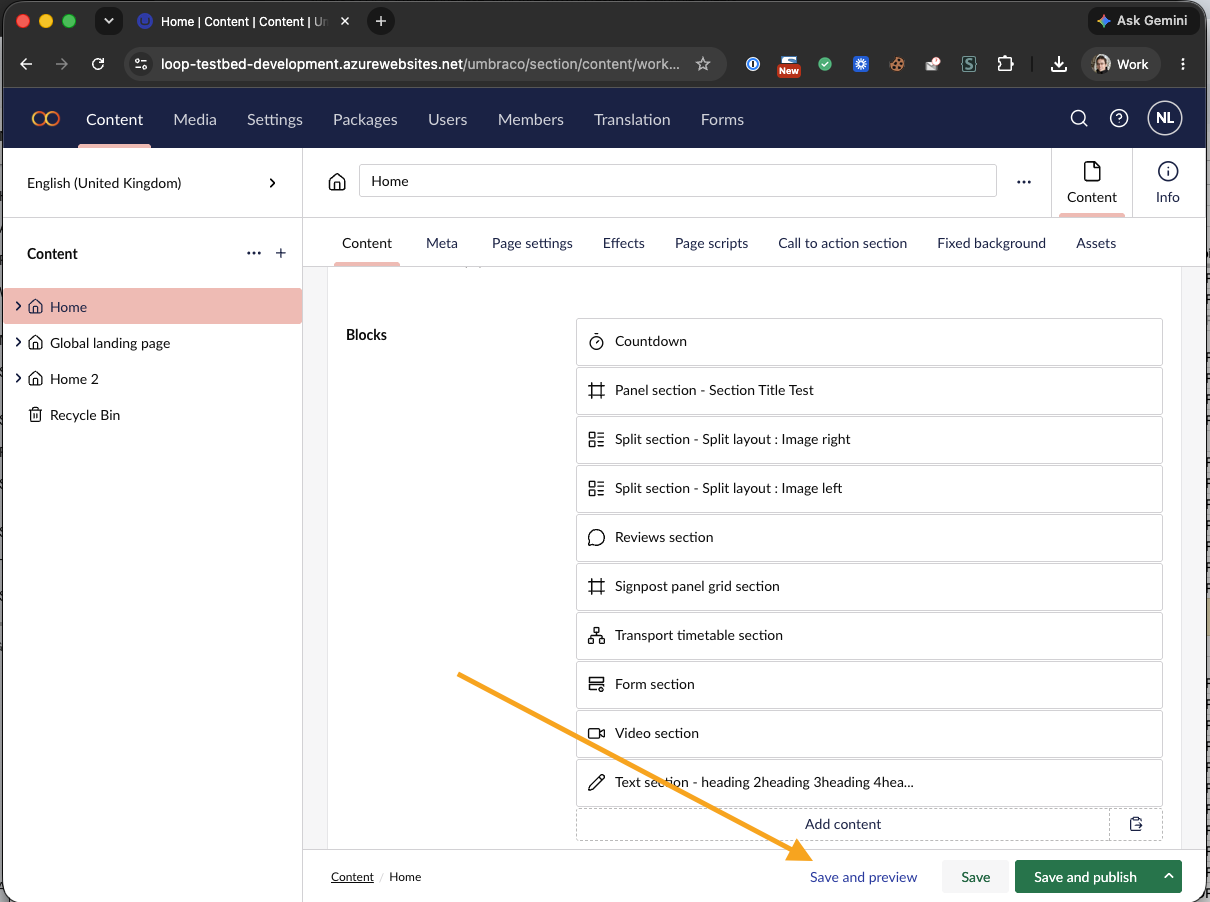
Using DEV or LIVE
You'll have been given DEV and LIVE links for your site in the post-launch onboarding.
- DEV and LIVE run on separate servers
- Remember to bookmark both CMS login pages so that you can easily access the correct server
- We are able to sync between DEV and LIVE, either per page, or as a whole section (message us for support if needed).
- You should have separate logins and passwords for DEV and LIVE
DEV is good for mapping out whole sections, multi-page campaigns or rebrands. Typically these are larger initiatives so just message us and we can coordinate a sync of specific pages, content or sections up from DEV to LIVE as needed.
Was this article helpful?
That’s Great!
Thank you for your feedback
Sorry! We couldn't be helpful
Thank you for your feedback
Feedback sent
We appreciate your effort and will try to fix the article